#include <photoEditWidget.h>
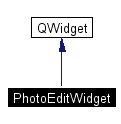
Inheritance diagram for PhotoEditWidget:

Definition at line 39 of file photoEditWidget.h.
Public Member Functions | |
| PhotoEditWidget (QWidget *parent=0, const char *name=0) | |
| Creates layout. | |
| ~PhotoEditWidget () | |
| Deletes objects. | |
| void | setPhoto (Photo *photo) |
| Sets the photo pointer. | |
Private Slots | |
| void | updateDescription (const QString &val) |
| Updates photo description. | |
| void | adjustExposure () |
| Adjusts Exposure of entire image. | |
| void | cropToRegion () |
| Cropped image to selected region. | |
| void | invertSelection () |
| Inverts selected region. | |
| void | grayscaleSelection () |
| Converts to grayscale selected region. | |
| void | reduceRedeye () |
| Applies redeye reduction to selected region. | |
| void | resetImageAction () |
| Resets photo to state before editing took place. | |
| void | returnFromEdit () |
| Returns to organizing mode. | |
Private Member Functions | |
| bool | findScaledSelection (QPoint &topLeft, QPoint &bottomRight) |
| Finds the selected region of the scaled imge. | |
| void | findActualSelection (QPoint &topLeft, QPoint &bottomRight, QImage *fullImage) |
| Finds the selection mapped into the full size image. | |
| void | applyImageUpdate (QImage *fullImage, QImage *editedImage) |
| Applies update to image. | |
Private Attributes | |
| QGridLayout * | grid |
| Grid widgets are placed in. | |
| QFrame * | buttons |
| Grid lower buttons are placed in. | |
| QGridLayout * | grid2 |
| Grid for lower buttons. | |
| QLabel * | photoDescription |
| Label "Photo Description:". | |
| QLineEdit * | photoDescriptionVal |
| Actual photo description. | |
| Photo * | photo |
| Pointer to backend photo. | |
| QImage * | originalImage |
| Backup of image before any manipulations were preformed, allows user to reset image. | |
| PhotoViewWidget * | photoView |
| Photo view, provides interface to see image and select regions of it. | |
| QToolButton * | adjExposureButton |
| "Adj. Exposure" button | |
| QToolButton * | cropButton |
| "Crop" button | |
| QToolButton * | invertButton |
| "Invert" button | |
| QToolButton * | grayscaleButton |
| "Grayscale" button | |
| QToolButton * | redEyeButton |
| "Red Eye" button | |
| QToolButton * | resetButton |
| "Reset" button | |
| QToolButton * | returnButton |
| "Return" button | |
| LayoutWidget * | layout |
| Pointer to the parent layout widget. | |
|
||||||||||||
|
Creates layout.
Definition at line 43 of file photoEditWidget.cpp. References adjExposureButton, adjustExposure(), buttons, cropButton, cropToRegion(), grayscaleButton, grayscaleSelection(), grid, grid2, IMAGE_PATH, invertButton, invertSelection(), layout, originalImage, photo, photoDescription, photoDescriptionVal, photoView, resetButton, resetImageAction(), returnButton, returnFromEdit(), and updateDescription().
00044 : 00045 QWidget(parent,name) 00046 { 00047 //set photo pointer to null by default 00048 photo = NULL; 00049 00050 //backup image null by default 00051 originalImage = NULL; 00052 00053 //store layout pointer 00054 layout = (LayoutWidget*)parent; 00055 00056 //create photo description labels 00057 photoDescription = new QLabel( this ); 00058 photoDescription->setText( tr("Photo Description:") ); 00059 photoDescription->setFont( QFont( "Times", 12, QFont::Bold ) ); 00060 photoDescriptionVal = new QLineEdit( this ); 00061 photoDescriptionVal->setFont( QFont( "Times", 12, QFont::Bold ) ); 00062 connect( photoDescriptionVal, SIGNAL(textChanged(const QString&)), 00063 SLOT(updateDescription(const QString&)) ); 00064 00065 //create photo label 00066 photoView = new PhotoViewWidget( this, "photo view" ); 00067 00068 //create buttons 00069 buttons = new QFrame(this); 00070 QFont buttonFont( qApp->font() ); 00071 buttonFont.setBold(true); 00072 buttonFont.setPointSize( 11 ); 00073 00074 adjExposureButton = new QToolButton( buttons ); 00075 adjExposureButton->setTextLabel(tr("Adj. Exposure")); 00076 adjExposureButton->setIconSet( QPixmap(QString(IMAGE_PATH)+"adjExposure.png") ); 00077 adjExposureButton->setTextPosition(QToolButton::Right); 00078 adjExposureButton->setFont( buttonFont ); 00079 adjExposureButton->setUsesTextLabel( true ); 00080 QToolTip::add( adjExposureButton, tr("Auto-adjust exposure") ); 00081 connect( adjExposureButton, SIGNAL(clicked()), SLOT(adjustExposure()) ); 00082 00083 cropButton = new QToolButton( buttons ); 00084 cropButton->setTextLabel(tr("Crop")); 00085 cropButton->setIconSet( QPixmap(QString(IMAGE_PATH)+"crop.png") ); 00086 cropButton->setTextPosition(QToolButton::Right); 00087 cropButton->setFont( buttonFont ); 00088 cropButton->setUsesTextLabel( true ); 00089 QToolTip::add( cropButton, tr("Crop to selected region") ); 00090 connect( cropButton, SIGNAL(clicked()), SLOT(cropToRegion()) ); 00091 00092 invertButton = new QToolButton( buttons ); 00093 invertButton->setTextLabel(tr("Invert")); 00094 invertButton->setIconSet( QPixmap(QString(IMAGE_PATH)+"invert.png") ); 00095 invertButton->setTextPosition(QToolButton::Right); 00096 invertButton->setFont( buttonFont ); 00097 invertButton->setUsesTextLabel( true ); 00098 QToolTip::add( invertButton, tr("Invert selected region") ); 00099 connect( invertButton, SIGNAL(clicked()), SLOT(invertSelection()) ); 00100 00101 grayscaleButton = new QToolButton( buttons ); 00102 grayscaleButton->setTextLabel(tr("Grayscale")); 00103 grayscaleButton->setIconSet( QPixmap(QString(IMAGE_PATH)+"grayscale.png") ); 00104 grayscaleButton->setTextPosition(QToolButton::Right); 00105 grayscaleButton->setFont( buttonFont ); 00106 grayscaleButton->setUsesTextLabel( true ); 00107 QToolTip::add( grayscaleButton, tr("Grayscale selected region") ); 00108 connect( grayscaleButton, SIGNAL(clicked()), SLOT(grayscaleSelection()) ); 00109 00110 /* 00111 redEyeButton = new QToolButton( buttons ); 00112 redEyeButton->setTextLabel(tr("Red Eye")); 00113 redEyeButton->setIconSet( QPixmap(QString(IMAGE_PATH)+"removeRedEye.png") ); 00114 redEyeButton->setTextPosition(QToolButton::Right); 00115 redEyeButton->setFont( buttonFont ); 00116 redEyeButton->setUsesTextLabel( true ); 00117 QToolTip::add( redEyeButton, tr("Remove redeye") ); 00118 connect( redEyeButton, SIGNAL(clicked()), SLOT(reduceRedeye()) ); 00119 */ 00120 00121 resetButton = new QToolButton( buttons ); 00122 resetButton->setTextLabel(tr("Reset")); 00123 resetButton->setIconSet( QPixmap(QString(IMAGE_PATH)+"reset.png") ); 00124 resetButton->setTextPosition(QToolButton::Right); 00125 resetButton->setFont( buttonFont ); 00126 resetButton->setUsesTextLabel( true ); 00127 QToolTip::add( resetButton, tr("Undo all modifications") ); 00128 connect( resetButton, SIGNAL(clicked()), SLOT(resetImageAction()) ); 00129 00130 returnButton = new QToolButton( buttons ); 00131 returnButton->setTextLabel(tr("Return")); 00132 returnButton->setIconSet( QPixmap(QString(IMAGE_PATH)+"return.png") ); 00133 returnButton->setTextPosition(QToolButton::Right); 00134 returnButton->setFont( buttonFont ); 00135 returnButton->setUsesTextLabel( true ); 00136 QToolTip::add( returnButton, tr("Return to subalbum layout") ); 00137 connect( returnButton, SIGNAL(clicked()), SLOT(returnFromEdit()) ); 00138 00139 //place all items in grid layout 00140 grid = new QGridLayout( this, 3, 3, 0 ); 00141 grid->addWidget( photoDescription, 0, 0, Qt::AlignLeft ); 00142 grid->addWidget( photoDescriptionVal, 0, 1 ); 00143 grid->addMultiCellWidget( photoView, 1, 1, 0, 2, Qt::AlignCenter ); 00144 00145 int numButtons = 6; 00146 grid2 = new QGridLayout( buttons, 1, numButtons+2, 0 ); 00147 00148 int buttonNum = 1; 00149 grid2->addWidget( adjExposureButton, 0, buttonNum++, Qt::AlignLeft ); 00150 grid2->addWidget( cropButton, 0, buttonNum++, Qt::AlignLeft ); 00151 grid2->addWidget( invertButton, 0, buttonNum++, Qt::AlignLeft ); 00152 grid2->addWidget( grayscaleButton, 0, buttonNum++, Qt::AlignLeft ); 00153 // grid2->addWidget( redEyeButton, 0, buttonNum++, Qt::AlignLeft ); 00154 grid2->addWidget( resetButton, 0, buttonNum++, Qt::AlignLeft ); 00155 grid2->addWidget( returnButton, 0, buttonNum++, Qt::AlignLeft ); 00156 00157 //set first and last column of button grid to take up remaining space 00158 grid2->setColStretch( 0, 1 ); 00159 grid2->setColStretch( 7, 1 ); 00160 grid->addMultiCellWidget( buttons, 2, 2, 0, 2 ); 00161 00162 //set the last column to stretch to fill any blank space 00163 grid->setColStretch( 2, 1 ); 00164 00165 //set photo row to stretch to fill any blank space 00166 grid->setRowStretch( 1, 1 ); 00167 00168 //Set the second column, the actual photo description 00169 //to have a minimum width 00170 grid->addColSpacing(1, 300 ); 00171 00172 //set the background of the widget to be white 00173 setPaletteBackgroundColor( QColor(255, 255, 255) ); 00174 } |
|
|
Deletes objects.
Definition at line 176 of file photoEditWidget.cpp. References originalImage.
00177 {
00178   delete originalImage;
00179   originalImage = NULL;
00180 }
|
|
|
Adjusts Exposure of entire image.
Definition at line 220 of file photoEditWidget.cpp. References Photo::actualSlideshowHeight(), Photo::actualSlideshowWidth(), applyImageUpdate(), findActualSelection(), findScaledSelection(), Photo::getImageFilename(), and photo. Referenced by PhotoEditWidget().
00221 {
00222   //---------------------------------
00223   //load the full image
00224   QImage *fullImage = new QImage( photo->getImageFilename() );
00225
00226   //determine selected portion of the image, if no region selected use entire image
00227   QPoint topLeft, bottomRight;
00228   if( ! findScaledSelection(topLeft, bottomRight) )
00229   {
00230     topLeft.setX(0);
00231     topLeft.setY(0);
00232     bottomRight.setX(photo->actualSlideshowWidth()-1);
00233     bottomRight.setY(photo->actualSlideshowHeight()-1);
00234   }
00235   //otherwise scale the selection to the full size
00236   else { findActualSelection(topLeft, bottomRight, fullImage); }
00237   //---------------------------------
00238   int redBuckets[256];
00239   int greenBuckets[256];
00240   int blueBuckets[256];
00241   int i;
00242
00243   //zero out buckets
00244   for(i=0; i<256; i++)
00245   {
00246     redBuckets[i] = 0;
00247     greenBuckets[i] = 0;
00248     blueBuckets[i] = 0;
00249   }
00250
00251   //fill buckets
00252   int x, y;
00253   for(x=0; x<fullImage->width(); x++)
00254   {
00255     for(y=0; y<fullImage->height(); y++)
00256     {
00257         QRgb pixelVal = fullImage->pixel( x, y );
00258         redBuckets[qRed(pixelVal)]++;
00259         greenBuckets[qGreen(pixelVal)]++;
00260         blueBuckets[qBlue(pixelVal)]++;
00261     }
00262   }
00263
00264   //find median index for each channel
00265   double goalSum = ((double) (fullImage->width() * fullImage->height()) ) / 2;
00266   int redSum = 0;
00267   int greenSum = 0;
00268   int blueSum = 0;
00269   int redIndex = -1;
00270   int greenIndex = -1;
00271   int blueIndex = -1;
00272
00273   int minRed, minGreen, minBlue;
00274   int maxRed, maxGreen, maxBlue;
00275   minRed = -1; minGreen = -1; minBlue = -1;
00276   maxRed = 0; maxGreen = 0; maxBlue = 0;
00277
00278   for(i=0; i<256; i++)
00279   {
00280     if(redSum < goalSum)
00281       redSum +=redBuckets[i];
00282     else if(redIndex == -1)
00283       redIndex = i;
00284     if(greenSum < goalSum)
00285       greenSum +=greenBuckets[i];
00286     else if(greenIndex == -1)
00287       greenIndex = i;
00288     if(blueSum < goalSum)
00289       blueSum +=blueBuckets[i];
00290     else if(blueIndex == -1)
00291       blueIndex = i;
00292
00293     if(redBuckets[i] != 0)
00294     {
00295       maxRed = i;
00296       if(minRed == -1)
00297         minRed = i;
00298     }
00299     if(greenBuckets[i] != 0)
00300     {
00301       maxGreen = i;
00302       if(minGreen == -1)
00303         minGreen = i;
00304     }
00305     if(blueBuckets[i] != 0)
00306     {
00307       maxBlue = i;
00308       if(minBlue == -1)
00309         minBlue = i;
00310     }
00311   }
00312
00313   //rescale each pixel
00314   QImage* editedImage = new QImage(fullImage->width(), fullImage->height(), fullImage->depth());
00315   for(x=0; x<fullImage->width(); x++)
00316   {
00317     for(y=0; y<fullImage->height(); y++)
00318     {
00319       QRgb val = fullImage->pixel( x, y );
00320       int adjRed, adjGreen, adjBlue;
00321
00322       if(qRed(val) < redIndex)
00323         adjRed = (int) (127 * ((double)(qRed(val) - minRed)) / (redIndex - minRed) + 0.5f);
00324       else
00325         adjRed = 127 + (int) ((((double) (127 * (qRed(val) - redIndex))) / (maxRed - redIndex)) + 0.5f);
00326
00327       if(qGreen(val) < greenIndex)
00328         adjGreen = (int) (127 * ((double)(qGreen(val) - minGreen)) / (greenIndex - minGreen) +0.5f);
00329       else
00330         adjGreen = 127 + (int) ( (((double) (127 * (qGreen(val) - greenIndex))) / (maxGreen - greenIndex)) + 0.5f);
00331
00332       if(qBlue(val) < blueIndex)
00333         adjBlue = (int) (127 * ((double)(qBlue(val) - minBlue)) / (blueIndex - minBlue) +0.5f);
00334       else
00335         adjBlue = 127 + (int) ( (((double) (127 * (qBlue(val) - blueIndex))) / (maxBlue - blueIndex)) + 0.5f);
00336
00337       val = qRgb( adjRed, adjGreen, adjBlue );
00338       editedImage->setPixel( x, y, val );
00339     }
00340   }
00341   //---------------------------------
00342   /*
00343   //find min and max gray values
00344   int grayMin, grayMax, x, y;
00345   grayMin = -1; grayMax = -1;
00346   for(x=0; x<fullImage->width(); x++)
00347   {
00348     for(y=0; y<fullImage->height(); y++)
00349     {
00350         int grayVal = qGray( fullImage->pixel( x, y ) );
00351
00352         //set first values if first pixel
00353         if(x == 0 && y == 0)
00354         {
00355           grayMin = grayVal;
00356           grayMax = grayVal;
00357         }
00358
00359         //otherwise compare against best
00360         if(grayVal < grayMin) { grayMin = grayVal; }
00361         if(grayVal > grayMax) { grayMax = grayVal; }
00362     }
00363   }
00364   //---------------------------------
00365   //rescale pixels
00366   QImage* editedImage = new QImage(fullImage->width(), fullImage->height(), fullImage->depth());
00367   float scaleFactor = 255.0f / (grayMax - grayMin);
00368   for(x=0; x<fullImage->width(); x++)
00369   {
00370     for(y=0; y<fullImage->height(); y++)
00371     {
00372       //find new shifted gray value
00373       float grayVal = qGray( fullImage->pixel( x, y ) );
00374       float newGrayVal = (grayVal - grayMin) * scaleFactor;
00375       float shift = newGrayVal / grayVal;
00376
00377       //scale original pixel color to match gray shift
00378       QRgb val = fullImage->pixel( x, y );
00379       val = qRgb( (int) (shift*qRed(val)), (int)(shift*qGreen(val)), (int)(shift*qBlue(val)) );
00380       editedImage->setPixel( x, y, val );
00381     }
00382   }
00383   */
00384   //---------------------------------
00385   //backup original if this is first modification, update photo object
00386   applyImageUpdate( fullImage, editedImage );
00387   //---------------------------------
00388 }
|
|
||||||||||||
|
Applies update to image. Set new image pointer and create all image forms Reload photo view Definition at line 596 of file photoEditWidget.cpp. References originalImage, photo, photoView, Photo::setImage(), and PhotoViewWidget::setPhoto(). Referenced by adjustExposure(), cropToRegion(), grayscaleSelection(), and invertSelection().
00597 {
00598   //If this is first manipulation to image then backup original, otherwise delete intermediate object
00599   if(originalImage == NULL) {  originalImage = fullImage; }
00600   else { delete fullImage; }
00601
00603   photo->setImage(editedImage);
00604
00606   photoView->setPhoto( photo );
00607 }
|
|
|
Cropped image to selected region.
Definition at line 390 of file photoEditWidget.cpp. References applyImageUpdate(), findActualSelection(), findScaledSelection(), Photo::getImageFilename(), and photo. Referenced by PhotoEditWidget().
00391 {
00392   //---------------------------------
00393   //determine selected portion of the image, if no region selected then return
00394   QPoint topLeft, bottomRight;
00395   if( ! findScaledSelection(topLeft, bottomRight) )
00396     return;
00397
00398   //load the full image
00399   QImage *fullImage = new QImage( photo->getImageFilename() );
00400
00401   //scale the selection to the full size
00402   findActualSelection(topLeft, bottomRight, fullImage);
00403   //---------------------------------
00404   //crop image
00405   QImage* editedImage = new QImage(bottomRight.x() - topLeft.x() + 1,
00406                                                       bottomRight.y() - topLeft.y() + 1,
00407                                                       fullImage->depth());
00408   int newX, newY, x, y;
00409   newX = 0;
00410   for(x=topLeft.x(); x<= bottomRight.x(); x++)
00411   {
00412     newY = 0;
00413     for(y=topLeft.y(); y<= bottomRight.y(); y++)
00414     {
00415       editedImage->setPixel( newX, newY, fullImage->pixel(x, y) );
00416       newY++;
00417     }
00418     newX++;
00419   }
00420   //---------------------------------
00421   //backup original if this is first modification, update photo object
00422   applyImageUpdate( fullImage, editedImage );
00423   //---------------------------------
00424 }
|
|
||||||||||||||||
|
Finds the selection mapped into the full size image.
Definition at line 573 of file photoEditWidget.cpp. References Photo::actualSlideshowHeight(), Photo::actualSlideshowWidth(), and photo. Referenced by adjustExposure(), cropToRegion(), grayscaleSelection(), and invertSelection().
00574 {
00575   //scale the selected coordinates up into actual full size coordinates
00576   float widthRatio = (1.0f * fullImage->width()) / photo->actualSlideshowWidth();
00577   float heightRatio = (1.0f * fullImage->height()) / photo->actualSlideshowHeight();
00578
00579   topLeft.setX( (int) (topLeft.x() * widthRatio) );
00580   topLeft.setY( (int) (topLeft.y() * heightRatio) );
00581
00582   //if user selected to end of photo fix selection to end rather
00583   //then scale and get numerical error which prevents selection
00584   //from running to edge ot photo
00585   if(bottomRight.x() == (photo->actualSlideshowWidth() - 1))
00586     bottomRight.setX( fullImage->width() - 1 );
00587   else
00588     bottomRight.setX( (int) (bottomRight.x() * widthRatio) );
00589
00590   if(bottomRight.y() == (photo->actualSlideshowHeight() - 1))
00591     bottomRight.setY( fullImage->height() - 1 );
00592   else
00593     bottomRight.setY( (int) (bottomRight.y() * heightRatio) );
00594 }
|
|
||||||||||||
|
Finds the selected region of the scaled imge.
Definition at line 560 of file photoEditWidget.cpp. References PhotoViewWidget::getSelection(), and photoView. Referenced by adjustExposure(), cropToRegion(), grayscaleSelection(), and invertSelection().
00561 {
00562   //get raw selection
00563   photoView->getSelection(topLeft, bottomRight);
00564
00565   //if selection has no width or height then bail immediately
00566   if(bottomRight.x() - topLeft.x() == 0 ||
00567      bottomRight.y() - topLeft.y() == 0)
00568      return false;
00569   else
00570     return true;
00571 }
|
|
|
Converts to grayscale selected region.
Definition at line 468 of file photoEditWidget.cpp. References Photo::actualSlideshowHeight(), Photo::actualSlideshowWidth(), applyImageUpdate(), findActualSelection(), findScaledSelection(), Photo::getImageFilename(), and photo. Referenced by PhotoEditWidget().
00469 {
00470   //---------------------------------
00471   //load the full image
00472   QImage *fullImage = new QImage( photo->getImageFilename() );
00473
00474   //determine selected portion of the image, if no region selected use entire image
00475   QPoint topLeft, bottomRight;
00476   if( ! findScaledSelection(topLeft, bottomRight) )
00477   {
00478     topLeft.setX(0);
00479     topLeft.setY(0);
00480     bottomRight.setX(photo->actualSlideshowWidth()-1);
00481     bottomRight.setY(photo->actualSlideshowHeight()-1);
00482   }
00483   //otherwise scale the selection to the full size
00484   else { findActualSelection(topLeft, bottomRight, fullImage); }
00485   //---------------------------------
00486   //grayscale selection
00487   QImage* editedImage = new QImage(fullImage->width(), fullImage->height(), fullImage->depth());
00488   int x, y;
00489   for(x=0; x<fullImage->width(); x++)
00490   {
00491     for(y=0; y<fullImage->height(); y++)
00492     {
00493       //if within selected region grayscale color
00494       if( x >= topLeft.x() && x <= bottomRight.x() && y >= topLeft.y() && y <= bottomRight.y())
00495       {
00496         QRgb val = fullImage->pixel( x, y );
00497         int gVal = qGray(val);
00498         editedImage->setPixel( x, y, qRgb( gVal, gVal, gVal ) );
00499       }
00500       //otherwise copy color
00501       else
00502       {  editedImage->setPixel( x, y, fullImage->pixel(x, y) );  }
00503     }
00504   }
00505   //---------------------------------
00506   //backup original if this is first modification, update photo object
00507   applyImageUpdate( fullImage, editedImage );
00508   //---------------------------------
00509 }
|
|
|
Inverts selected region.
Definition at line 426 of file photoEditWidget.cpp. References Photo::actualSlideshowHeight(), Photo::actualSlideshowWidth(), applyImageUpdate(), findActualSelection(), findScaledSelection(), Photo::getImageFilename(), and photo. Referenced by PhotoEditWidget().
00427 {
00428   //---------------------------------
00429   //load the full image
00430   QImage *fullImage = new QImage( photo->getImageFilename() );
00431
00432   //determine selected portion of the image, if no region selected use entire image
00433   QPoint topLeft, bottomRight;
00434   if( ! findScaledSelection(topLeft, bottomRight) )
00435   {
00436     topLeft.setX(0);
00437     topLeft.setY(0);
00438     bottomRight.setX(photo->actualSlideshowWidth()-1);
00439     bottomRight.setY(photo->actualSlideshowHeight()-1);
00440   }
00441   //otherwise scale the selection to the full size
00442   else { findActualSelection(topLeft, bottomRight, fullImage); }
00443   //---------------------------------
00444   //invert image
00445   QImage* editedImage = new QImage(fullImage->width(), fullImage->height(), fullImage->depth());
00446   int x, y;
00447   for(x=0; x<fullImage->width(); x++)
00448   {
00449     for(y=0; y<fullImage->height(); y++)
00450     {
00451       //if within selected region invert color
00452       if( x >= topLeft.x() && x <= bottomRight.x() && y >= topLeft.y() && y <= bottomRight.y())
00453       {
00454         QRgb val = fullImage->pixel( x, y );
00455         val = qRgb( 255 - qRed(val), 255 - qGreen(val), 255 - qBlue(val) );
00456         editedImage->setPixel( x, y, val );
00457       }
00458       //otherwise copy color
00459       else {  editedImage->setPixel( x, y, fullImage->pixel(x, y) );  }
00460     }
00461   }
00462   //---------------------------------
00463   //backup original if this is first modification, update photo object
00464   applyImageUpdate( fullImage, editedImage );
00465   //---------------------------------
00466 }
|
|
|
Applies redeye reduction to selected region.
Definition at line 511 of file photoEditWidget.cpp.
00512 {
00513
00514 }
|
|
|
Resets photo to state before editing took place. Set new image pointer and create all image forms Reload photo view Definition at line 516 of file photoEditWidget.cpp. References originalImage, photo, photoView, Photo::setImage(), and PhotoViewWidget::setPhoto(). Referenced by PhotoEditWidget(), and returnFromEdit().
00517 {
00518   //if previous state saved revert all changes
00519   if(originalImage != NULL)
00520   {
00522     photo->setImage(originalImage);
00523
00524     //set image function deletes object once done so remove pointer to memory
00525     //we don't own any more
00526     originalImage = NULL;
00527
00529     photoView->setPhoto( photo );
00530   }
00531 }
|
|
|
Returns to organizing mode.
Definition at line 533 of file photoEditWidget.cpp. References layout, originalImage, resetImageAction(), and LayoutWidget::stopEdit(). Referenced by PhotoEditWidget().
00534 {
00535   //no changes? then just exit
00536   if(originalImage == NULL)
00537   {
00538     layout->stopEdit(true);
00539     return;
00540   }
00541
00542   //otherwise ask user if they are sure they want to permantly scare their photo :)
00543   QuestionDialog sure( tr("Keep changes?"),
00544                        tr("Once applied alterations cannot be undone."),
00545                        "warning.png",
00546                        this );
00547   //apply changes and exit
00548   if(sure.exec())
00549   {
00550     layout->stopEdit(true);
00551   }
00552   //revert before exiting
00553   else
00554   {
00555     resetImageAction();
00556     layout->stopEdit(true);
00557   }
00558 }
|
|
|
Sets the photo pointer.
Definition at line 182 of file photoEditWidget.cpp. References originalImage, photoDescriptionVal, photoView, resizeImage(), PhotoViewWidget::setPhoto(), SLIDESHOW_HEIGHT, and SLIDESHOW_WIDTH. Referenced by LayoutWidget::editPhoto().
00183 {
00184   //store photo object handle
00185   this->photo = photo;
00186
00187   //delete old original photo
00188   delete originalImage;
00189   originalImage = NULL;
00190
00191   //set description
00192   photoDescriptionVal->setText( photo->getDescription() );
00193
00194   //update view of photo
00195   photoView->setPhoto(photo);
00196
00197   //check to see if slideshow dimensions are known,
00198   //if not load image now and compute size, set
00199   //dimensions in photo object for future use
00200   if(photo->actualSlideshowWidth() == -1)
00201   {
00202     QImage *backendImage = new QImage( photo->getImageFilename() );
00203
00204     int w, h;
00205     resizeImage( backendImage->width(), backendImage->height(),
00206                       SLIDESHOW_WIDTH, SLIDESHOW_HEIGHT,
00207                       w, h);
00208     photo->setActualSlideshowDimensions( w, h);
00209     delete backendImage;
00210     backendImage = NULL;
00211   }
00212 }
|
|
|
Updates photo description.
Definition at line 214 of file photoEditWidget.cpp. References photo, and Photo::setDescription(). Referenced by PhotoEditWidget().
00215 {
00216   if(photo != NULL)
00217     photo->setDescription(val);
00218 }
|
|
|
"Adj. Exposure" button
Definition at line 115 of file photoEditWidget.h. Referenced by PhotoEditWidget(). |
|
|
Grid lower buttons are placed in.
Definition at line 93 of file photoEditWidget.h. Referenced by PhotoEditWidget(). |
|
|
"Crop" button
Definition at line 118 of file photoEditWidget.h. Referenced by PhotoEditWidget(). |
|
|
"Grayscale" button
Definition at line 124 of file photoEditWidget.h. Referenced by PhotoEditWidget(). |
|
|
Grid widgets are placed in.
Definition at line 90 of file photoEditWidget.h. Referenced by PhotoEditWidget(). |
|
|
Grid for lower buttons.
Definition at line 96 of file photoEditWidget.h. Referenced by PhotoEditWidget(). |
|
|
"Invert" button
Definition at line 121 of file photoEditWidget.h. Referenced by PhotoEditWidget(). |
|
|
Pointer to the parent layout widget.
Definition at line 136 of file photoEditWidget.h. Referenced by PhotoEditWidget(), and returnFromEdit(). |
|
|
Backup of image before any manipulations were preformed, allows user to reset image.
Definition at line 109 of file photoEditWidget.h. Referenced by applyImageUpdate(), PhotoEditWidget(), resetImageAction(), returnFromEdit(), setPhoto(), and ~PhotoEditWidget(). |
|
|
Pointer to backend photo.
Definition at line 105 of file photoEditWidget.h. Referenced by adjustExposure(), applyImageUpdate(), cropToRegion(), findActualSelection(), grayscaleSelection(), invertSelection(), PhotoEditWidget(), resetImageAction(), and updateDescription(). |
|
|
Label "Photo Description:".
Definition at line 99 of file photoEditWidget.h. Referenced by PhotoEditWidget(). |
|
|
Actual photo description.
Definition at line 102 of file photoEditWidget.h. Referenced by PhotoEditWidget(), and setPhoto(). |
|
|
Photo view, provides interface to see image and select regions of it.
Definition at line 112 of file photoEditWidget.h. Referenced by applyImageUpdate(), findScaledSelection(), PhotoEditWidget(), resetImageAction(), and setPhoto(). |
|
|
"Red Eye" button
Definition at line 127 of file photoEditWidget.h. |
|
|
"Reset" button
Definition at line 130 of file photoEditWidget.h. Referenced by PhotoEditWidget(). |
|
|
"Return" button
Definition at line 133 of file photoEditWidget.h. Referenced by PhotoEditWidget(). |
 1.3.4
1.3.4